Kubernetes Orchestration Guide: From Zero to Production
Learn kubernetes orchestration from scratch. This guide covers architecture, deployments, scaling, and 2026 features like Gateway API.
Kubernetes orchestration is how most production workloads run today — and for good reason. With over 40,000 contributors and backing from every major cloud provider, Kubernetes has become the de facto standard for deploying, scaling, and managing containerized applications. But getting started can feel overwhelming.
This guide cuts through the complexity. Whether you are deploying your first container or planning a production cluster, you will learn how Kubernetes orchestrates containers, what changed in 2025-2026, and how to go from zero to a running application step by step.
TL;DR — What You Need to Know
- Kubernetes automates deploying, scaling, and healing containerized apps across clusters of machines
- It uses a control plane + worker node architecture where you declare what you want, and Kubernetes makes it happen
- Key resources: Pods (smallest unit), Deployments (manage rollouts), Services (networking), Ingress/Gateway API (external traffic)
- In 2026, Gateway API has replaced Ingress as the recommended approach for routing, and Sidecar Containers are now a native feature
- You can start locally with minikube or kind, then scale to managed services like EKS, GKE, or AKS
How Does Kubernetes Orchestrate Containers?
Before diving into setup, it helps to understand what “orchestration” actually means in this context. Think of it like this: Docker lets you build and run a single container. Kubernetes is the conductor that coordinates hundreds or thousands of those containers across multiple machines.
Here is what Kubernetes handles automatically:
- Scheduling: Deciding which machine (node) should run each container based on available CPU, memory, and custom constraints
- Self-healing: If a container crashes, Kubernetes restarts it. If a node goes down, it reschedules the containers elsewhere
- Scaling: Adding or removing container replicas based on demand — horizontally (more instances) or vertically (more resources per instance)
- Rolling updates: Deploying new versions with zero downtime by gradually replacing old containers with new ones
- Service discovery: Containers find each other through DNS and internal networking without hardcoded addresses
- Secret management: Storing passwords, API keys, and certificates separately from your application code
Without an orchestrator, you would need to SSH into servers, manually start containers, monitor them, and restart them when they fail. At scale, that is simply not feasible.
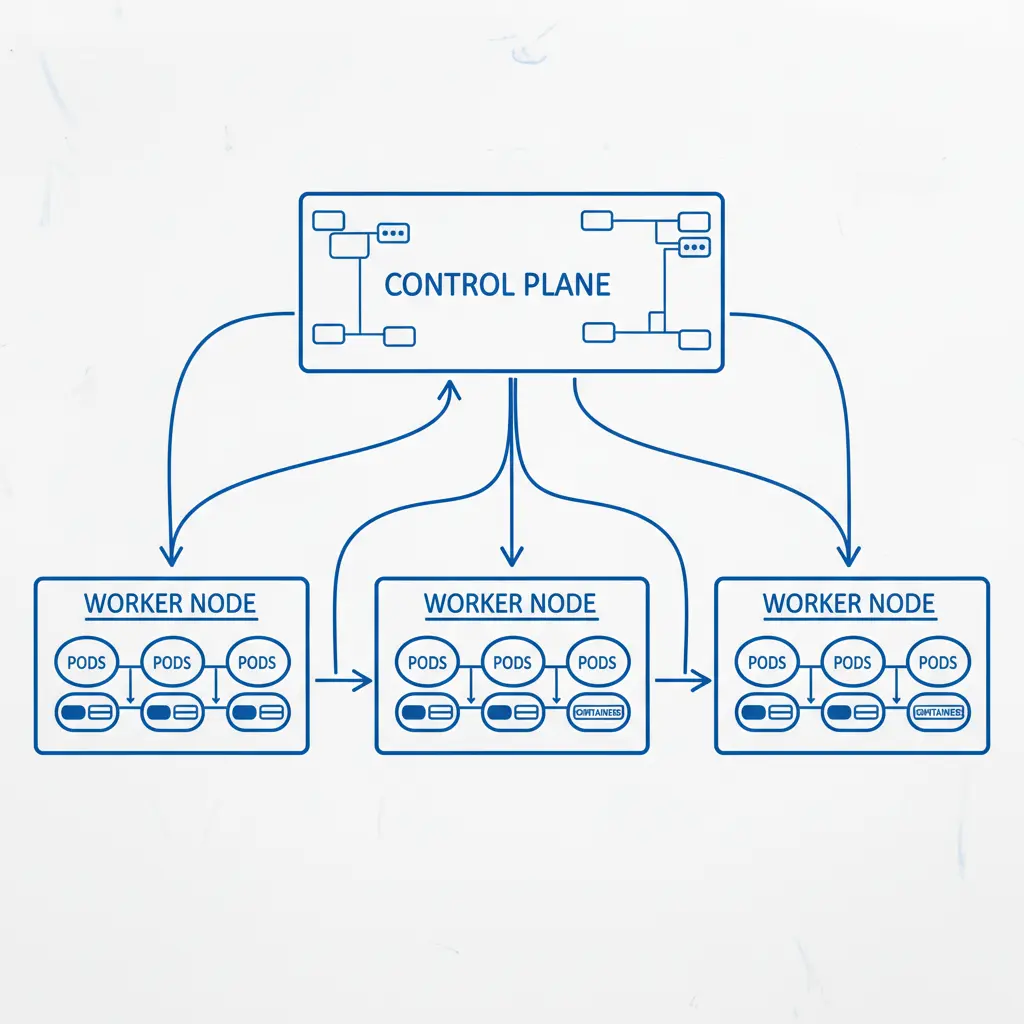
Kubernetes Architecture: Control Plane and Worker Nodes
Every Kubernetes cluster has two main parts: the control plane that makes decisions and the worker nodes that run your applications.
Control Plane Components
The control plane is the brain of the cluster. It runs on dedicated machines (or is managed by your cloud provider) and consists of four core components:
| Component | Role |
|---|---|
| kube-apiserver | The front door — every command you run goes through this REST API |
| etcd | Distributed key-value store that holds all cluster state and configuration |
| kube-scheduler | Watches for new Pods and assigns them to nodes based on resource requirements |
| kube-controller-manager | Runs control loops that monitor cluster state and make corrections (e.g., maintaining replica counts) |
Worker Node Components
Worker nodes are the machines where your containers actually run. Each node has:
- kubelet: An agent that ensures containers described in Pod specs are running and healthy
- kube-proxy: Manages network rules so Pods can communicate with each other and the outside world
- Container runtime: The software that actually runs containers — typically containerd (Docker’s runtime was deprecated in Kubernetes 1.24 and removed in later versions)
How They Work Together
When you run kubectl apply -f deployment.yaml, here is what happens:
kubectlsends your YAML to the API server- The API server validates the request and stores it in etcd
- The scheduler notices unassigned Pods and picks the best node for each one
- The kubelet on the chosen node pulls the container image and starts the Pod
- Controllers continuously monitor the state — if a Pod dies, the Deployment controller creates a replacement
This declarative model is what makes Kubernetes powerful. You tell it what you want (3 replicas of my app), and it figures out how to make that happen.
Docker vs Kubernetes Orchestration: Understanding the Difference
One of the most common questions beginners ask: “Do I need Docker or Kubernetes?” The answer is both — they solve different problems.
| Aspect | Docker | Kubernetes |
|---|---|---|
| What it does | Builds and runs individual containers | Orchestrates many containers across machines |
| Scope | Single host | Multi-host cluster |
| Scaling | Manual (docker run more instances) | Automatic (HPA scales based on metrics) |
| Self-healing | Restart policy per container | Reschedules across nodes, replaces failed Pods |
| Networking | Basic bridge networking | Full service discovery, load balancing, DNS |
| Use case | Development, simple deployments | Production workloads at scale |
Docker Compose can orchestrate multiple containers on a single machine, which works fine for development. But the moment you need to run across multiple servers, handle failover, or scale dynamically, you need something like Kubernetes.
Worth noting: Kubernetes no longer uses Docker as its container runtime. Since version 1.24, Kubernetes uses containerd directly. Your Docker images still work perfectly — the change is only in how the runtime executes them under the hood.
Setting Up Your First Cluster: A Step-by-Step Tutorial
Let’s get hands-on. We will set up a local Kubernetes cluster, deploy an application, expose it to the network, and scale it — all in about 15 minutes.
Prerequisites
You need two things installed:
- kubectl: The Kubernetes command-line tool
- minikube: A tool that runs a single-node Kubernetes cluster locally
# Install kubectl (macOS with Homebrew)
brew install kubectl

# Install minikube
brew install minikube

# Start your cluster
minikube start

# Verify it's running
kubectl cluster-info
Step 1: Create a Deployment
A Deployment tells Kubernetes what container to run and how many replicas you want. Create a file called app-deployment.yaml:
apiVersion: apps/v1
kind: Deployment
metadata:
  name: hello-app
spec:
  replicas: 3
  selector:
    matchLabels:
      app: hello
  template:
    metadata:
      labels:
        app: hello
    spec:
      containers:
      - name: hello
        image: gcr.io/google-samples/hello-app:2.0
        ports:
        - containerPort: 8080
        resources:
          requests:
            cpu: "100m"
            memory: "128Mi"
          limits:
            cpu: "250m"
            memory: "256Mi"
Apply it:
kubectl apply -f app-deployment.yaml

# Check your Pods
kubectl get pods
You should see three Pods starting up. If one crashes, Kubernetes will automatically restart it.
Step 2: Expose with a Service
Pods get ephemeral IP addresses that change when they restart. A Service gives your Pods a stable endpoint:
apiVersion: v1
kind: Service
metadata:
  name: hello-service
spec:
  type: ClusterIP
  selector:
    app: hello
  ports:
  - port: 80
    targetPort: 8080
kubectl apply -f hello-service.yaml
# Access it locally via minikube
minikube service hello-service --urlStep 3: Scale Your Application
Scaling is a single command:
# Scale to 5 replicas
kubectl scale deployment hello-app --replicas=5

# Watch Pods come up
kubectl get pods -w
For automatic scaling based on CPU usage, use a Horizontal Pod Autoscaler:
kubectl autoscale deployment hello-app --min=3 --max=10 --cpu-percent=70Now Kubernetes will add replicas when CPU exceeds 70% and remove them when demand drops.
Step 4: Perform a Rolling Update
Update your app to a new version with zero downtime:
kubectl set image deployment/hello-app hello=gcr.io/google-samples/hello-app:3.0

# Watch the rollout progress
kubectl rollout status deployment/hello-app

# If something goes wrong, roll back instantly
kubectl rollout undo deployment/hello-app
Kubernetes gradually replaces old Pods with new ones, ensuring your application stays available throughout the update.
What Changed in 2025-2026: New Features You Should Know
If you learned Kubernetes a few years ago, several important changes have landed since then. Here are the ones that matter most for day-to-day work.
Gateway API Is Now the Standard
The old Ingress resource — used for routing external HTTP traffic to your services — has been superseded by the Gateway API. It reached GA (General Availability) status and is now the recommended approach. Why the switch?
- More expressive: Gateway API supports HTTP, gRPC, and TCP routing natively
- Role-based: Separates infrastructure concerns (GatewayClass, Gateway) from application routing (HTTPRoute), so platform teams and app teams can work independently
- Portable: Works consistently across cloud providers and ingress controllers
A basic Gateway API setup looks like this:
apiVersion: gateway.networking.k8s.io/v1
kind: HTTPRoute
metadata:
  name: hello-route
spec:
  parentRefs:
  - name: my-gateway
  rules:
  - matches:
    - path:
        type: PathPrefix
        value: /hello
    backendRefs:
    - name: hello-service
      port: 80
Native Sidecar Containers
Sidecar containers — helper containers that run alongside your main app (for logging, proxies, etc.) — are now a native Kubernetes feature. Previously, sidecars were just regular containers in a Pod with no lifecycle guarantees. Now you can define them as initContainers with restartPolicy: Always, and Kubernetes ensures they start before your app and shut down after it.
initContainers:
- name: log-collector
  image: fluentd:latest
  restartPolicy: Always
Kueue for Batch and AI Workloads
Kueue is a Kubernetes-native job queueing system designed for batch processing, HPC, and AI/ML training workloads. It manages resource quotas and priorities across teams, making it much easier to share a cluster for GPU-heavy tasks like model training. If you are running AI workloads on Kubernetes, Kueue is worth evaluating.
Other Notable Changes
- Pod Security Admission is now the standard (PodSecurityPolicy was removed)
- Validating Admission Policies use CEL expressions instead of webhooks for simpler policy enforcement
- In-place Pod vertical scaling (beta) lets you resize CPU/memory without restarting Pods
Kubernetes Orchestration Tools and Alternatives
Kubernetes is the dominant orchestrator, but it is not the only option — and it is not always the right one.
Essential Kubernetes Tools
| Tool | Purpose |
|---|---|
| Helm | Package manager for Kubernetes — bundles YAML into reusable “charts” |
| Kustomize | Template-free YAML customization (built into kubectl) |
| ArgoCD | GitOps continuous deployment — syncs your cluster state from Git |
| Prometheus + Grafana | Monitoring and alerting stack |
| cert-manager | Automatic TLS certificate management |
| Lens / k9s | GUI and TUI dashboards for cluster management |
Alternatives to Kubernetes
Not every project needs Kubernetes. Here is when you might choose differently:
- Docker Compose: Great for single-server deployments, development environments, and simple stacks. If you are running fewer than 10 containers on one server, Compose is simpler and faster
- Nomad (HashiCorp): Lighter weight, supports non-container workloads (VMs, binaries), simpler to operate. Good for teams that find Kubernetes too complex
- Amazon ECS: AWS-native container orchestration without the Kubernetes abstraction layer. Less portable, but deeply integrated with AWS services
- Cloud Run / AWS Fargate: Serverless containers — you just push an image and the cloud runs it. No cluster management at all. Best for stateless HTTP workloads
Why Are People Moving Away from Kubernetes?
You might have heard this claim. The reality is nuanced. Most organizations are not abandoning Kubernetes — they are abstracting it away. Managed services like GKE Autopilot, EKS Fargate Mode, and platform-as-a-service layers like Render or Railway run Kubernetes under the hood but hide the complexity.
The honest assessment: if your team has fewer than 5 services and no need for multi-region deployment, Kubernetes is likely overkill. Start with something simpler and graduate to Kubernetes when you genuinely need its capabilities.
Pros and Cons of Kubernetes Orchestration
| Pros | Cons |
|---|---|
| Industry standard with massive ecosystem | Steep learning curve for beginners |
| Self-healing and automatic scaling | Significant operational overhead for self-managed clusters |
| Works on any cloud or on-premises | Resource-heavy — control plane alone needs 2+ GB RAM |
| Declarative configuration (GitOps friendly) | YAML sprawl can become unmanageable |
| Huge community and job market demand | Overkill for small projects with few services |
| Extensible via CRDs and operators | Networking and storage configuration can be complex |
Who Should Use Kubernetes?
Kubernetes is a strong fit if you:
- Run 10+ microservices that need independent scaling
- Need multi-cloud or hybrid deployment capabilities
- Require zero-downtime deployments and automatic rollbacks
- Have a platform team (or budget for managed Kubernetes) to handle operations
- Run batch, AI/ML, or GPU workloads at scale
Consider alternatives if you:
- Have a single monolithic application
- Run fewer than 5 services on a single server
- Are a solo developer or small team without DevOps experience
- Need to ship fast without infrastructure overhead
Frequently Asked Questions
How Does Kubernetes Orchestrate Containers?
Kubernetes uses a declarative model. You describe your desired state in YAML files — how many replicas, what image, what resources — and submit them to the API server. The control plane (scheduler, controllers, etcd) continuously works to match the actual state to your desired state. If a container crashes, the controller creates a new one. If a node fails, the scheduler moves workloads elsewhere. You never manage individual containers directly.
What Is the Difference Between Docker and Kubernetes Orchestration?
Docker builds and runs containers on a single machine. Kubernetes orchestrates containers across a cluster of machines. Docker is like hiring one worker; Kubernetes is like managing an entire team. You typically use Docker to build your container images, then use Kubernetes to deploy and manage them in production. Since Kubernetes 1.24, the runtime uses containerd instead of Docker, but Docker-built images are fully compatible.
Is Kubernetes an Orchestration Tool or a Container?
Kubernetes is an orchestration platform, not a container or container runtime. It does not build or run containers itself — it tells container runtimes (like containerd or CRI-O) what to run, when, and where. Think of Kubernetes as the management layer that sits above containers and coordinates them at scale.
Why Are People Moving Away from Kubernetes?
Most are not leaving Kubernetes entirely — they are abstracting the complexity. Managed services like GKE Autopilot and EKS handle the operational burden so teams focus on applications, not infrastructure. Some teams with simple deployments find Kubernetes genuinely unnecessary and choose lighter alternatives like Docker Compose or serverless platforms. The trend is less “abandoning Kubernetes” and more “not managing it yourself.”
Is It Worth Learning Kubernetes in 2026?
Absolutely. Kubernetes skills remain among the highest-paying in DevOps and cloud engineering, and adoption continues to grow. Even if you use managed services, understanding Kubernetes concepts — Pods, Deployments, Services, scaling — is essential for debugging, optimization, and architecture decisions. The ecosystem is also stabilizing, with Gateway API and native sidecars reducing the amount of third-party tooling you need.
The Bottom Line
Kubernetes orchestration is the industry standard for running containers in production, and that is not changing anytime soon. The learning curve is real, but the 2025-2026 improvements — Gateway API, native sidecars, Kueue, and better managed services — have made it more accessible than ever. Start with minikube, deploy your first app using the tutorial above, and build from there. You do not need to learn everything at once. Master Pods, Deployments, and Services first, and the rest will follow.
Product recommendations are based on independent research and testing. We may earn a commission through affiliate links at no extra cost to you.